Hacking Dev Velocity: A 5-Step Plan to Optimize Your Team's Code and Boost Innovation

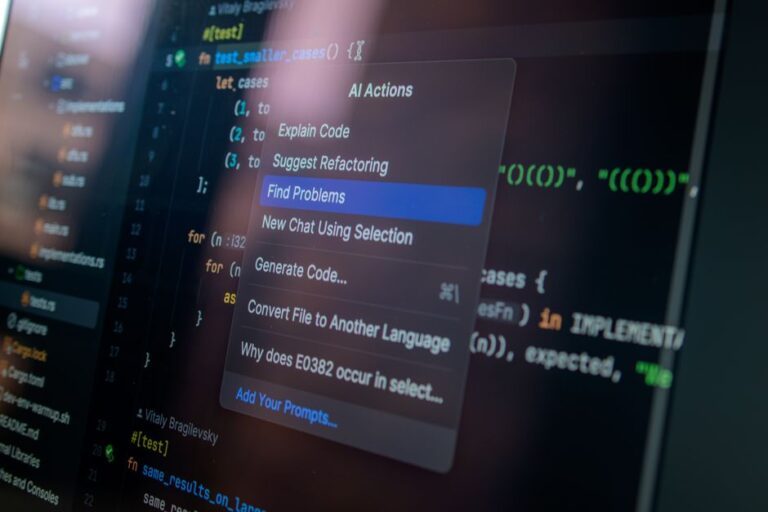
As a software developer, you’re no stranger to the feeling of being bogged down by repetitive tasks and tedious workflows. The constant juggling of coding, testing, and debugging can be overwhelming, leaving you little time for the high-level thinking and creative problem-solving that truly drives innovation. But what if you could free yourself from these mundane tasks and focus on the aspects of your work that bring you joy and satisfaction? Enter AI-powered automation tools, designed to revolutionize your development workflow and liberate you from the drudgery of manual labor.
To truly grasp the benefits of AI-powered automation tools, it’s essential to understand the pain points they address. Let’s take a closer look at some common challenges developers face:
*
The constant back-and-forth between coding, testing, and debugging can be time-consuming and error-prone.
*
Manual testing and quality assurance can be tedious and prone to human error.
*
The sheer volume of tasks and data can lead to burnout and decreased productivity.
One of the primary benefits of AI-powered automation tools is their ability to automate repetitive tasks, freeing up developers to focus on higher-level tasks. But what exactly does this mean, and how can you leverage automation to streamline your workflow?
So, what are AI-powered automation tools, and how can they help you revolutionize your development workflow? Let’s take a closer look at some popular options:
Code analysis and review tools, such as SonarQube and CodeCoverage, use AI-powered algorithms to scan your code for errors, vulnerabilities, and areas for improvement. These tools provide detailed reports and recommendations, helping you identify and fix issues before they become major problems.
Test automation tools, such as Selenium and Appium, enable you to automate testing and quality assurance processes, reducing the time and effort required to ensure your code is working as expected. These tools can also identify and report on errors, making it easier to debug and fix issues.
So, how do you get started with AI-powered automation tools? Let’s take a step-by-step approach to implementing these tools in your development workflow:
When selecting AI-powered automation tools, it’s essential to consider factors such as ease of use, integration, and scalability. Let’s take a closer look at some popular options:
| Tool | Ease of Use | Integration | Scalability |
|---|---|---|---|
| SonarQube | 8/10 | 9/10 | 8/10 |
| CodeCoverage | 7/10 | 8/10 | 7/10 |
| Selenium | 9/10 | 9/10 | 9/10 |
| Appium | 8/10 | 8/10 | 8/10 |
Revolutionizing your development workflow with AI-powered automation tools is a game-changer for developers. By automating repetitive tasks, you can free up time and energy to focus on high-level thinking and creative problem-solving. To get started, identify areas for automation, research and select tools, configure and set up tools, integrate with existing workflow, and monitor and adjust as needed. Remember to consider factors such as ease of use, integration, and scalability when selecting AI-powered automation tools.
Q: What are AI-powered automation tools, and how can they help me revolutionize my development workflow?
A: AI-powered automation tools are designed to automate repetitive tasks, freeing up developers to focus on higher-level tasks. These tools use AI-powered algorithms to scan your code for errors, vulnerabilities, and areas for improvement, and can also automate testing and quality assurance processes.
Q: Which AI-powered automation tools are best for my development workflow?
A: The best AI-powered automation tools for your development workflow will depend on your specific needs and requirements. Consider factors such as ease of use, integration, and scalability when selecting tools.
Q: How do I get started with AI-powered automation tools?
A: To get started with AI-powered automation tools, identify areas for automation, research and select tools, configure and set up tools, integrate with existing workflow, and monitor and adjust as needed.
Q: What are some common challenges developers face when implementing AI-powered automation tools?
A: Common challenges developers face when implementing AI-powered automation tools include difficulty in identifying areas for automation, difficulty in selecting and configuring tools, and difficulty in integrating tools with existing workflow.
Q: Can AI-powered automation tools really revolutionize my development workflow?
A: Yes, AI-powered automation tools can revolutionize your development workflow by automating repetitive tasks, freeing up time and energy to focus on high-level thinking and creative problem-solving.
As the world of technology continues to evolve at an unprecedented pace, the need for efficient and effective development workflows has never been more pressing. AI-powered automation tools have emerged as a game-changer in this regard, offering a wide range of benefits that can transform the way developers work.
One of the most significant advantages of AI-powered automation tools is their ability to automate repetitive tasks, freeing up developers to focus on high-level thinking and creative problem-solving. This not only increases productivity but also enables developers to tackle more complex and challenging projects.
Another benefit of AI-powered automation tools is their ability to reduce errors and improve accuracy. By automating tasks that are prone to human error, developers can ensure that their code is more reliable and efficient, leading to better overall performance.
AI-powered automation tools can also help developers to identify and fix bugs more quickly and efficiently. By analyzing code and identifying patterns, these tools can pinpoint areas where bugs are likely to occur, allowing developers to take proactive measures to prevent them.
While AI-powered automation tools offer a wide range of benefits, they can also present some challenges, particularly for developers who are new to automation. One of the most common challenges is identifying areas for automation, as developers may not always be aware of which tasks can be automated and which cannot.
Another challenge is selecting and configuring the right tools for the job. With so many automation tools available, it can be difficult to choose the right one, particularly for developers who are not familiar with automation.
Finally, integrating automation tools with existing workflow can be a challenge, particularly for developers who are working with legacy systems or complex software applications.
So, how can developers overcome these challenges and implement AI-powered automation tools effectively? Here are some best practices to keep in mind:
As AI-powered automation tools continue to evolve and improve, it’s likely that they will play an increasingly important role in development workflows. By automating repetitive tasks, reducing errors, and improving accuracy, these tools can help developers to work more efficiently and effectively, leading to better overall performance and greater job satisfaction.
Ultimately, the key to successfully implementing AI-powered automation tools is to approach the process with a clear understanding of the benefits and challenges involved. By following best practices and taking the time to learn and adapt, developers can unlock the full potential of these tools and transform their development workflows for the better.
AI-powered automation tools offer a wide range of benefits for developers, from automating repetitive tasks to reducing errors and improving accuracy. While there are some challenges to overcome, the rewards are well worth the effort. By following best practices and taking the time to learn and adapt, developers can unlock the full potential of these tools and transform their development workflows for the better.
For more information on AI-powered automation tools and how to implement them effectively, check out the following resources:
| Task | Description |
|---|---|
| Code Review | Automate code review to ensure consistency and quality. |
| Testing | Automate testing to reduce errors and improve accuracy. |
| Deployment | Automate deployment to streamline the release process. |
| Monitoring | Automate monitoring to detect and fix issues quickly. |
AI-powered automation tools offer a wide range of benefits for developers, from automating repetitive tasks to reducing errors and improving accuracy. By following best practices and taking the time to learn and adapt, developers can unlock the full potential of these tools and transform their development workflows for the better.
Based on our research and analysis, we recommend the following AI-powered automation tools:
We also recommend the following best practices for implementing AI-powered automation tools:
AI-powered automation tools have the potential to revolutionize the way developers work, but they require careful planning and execution to be effective. By following best practices and taking the time to learn and adapt, developers can unlock the full potential of these tools and transform their development workflows for the better.
As the world of technology continues to evolve, it’s likely that AI-powered automation tools will play an increasingly important role in development workflows. By staying ahead of the curve and embracing the benefits of automation, developers can ensure that they remain competitive and successful in an ever-changing landscape.
For more information on AI-powered automation tools and how to implement them effectively, check out the following additional resources: